Thread Rating:
  • 0 Vote(s) - 0 Average
  • 1
  • 2
  • 3
  • 4
  • 5
Resynthesizer for Windows Gimp 3
#1
Credits to JamesH and this post https://gimpchat.com/viewtopic.php?f=33&t=21535&start=0

..always worth having a backup, forums can go offline just when you need them.

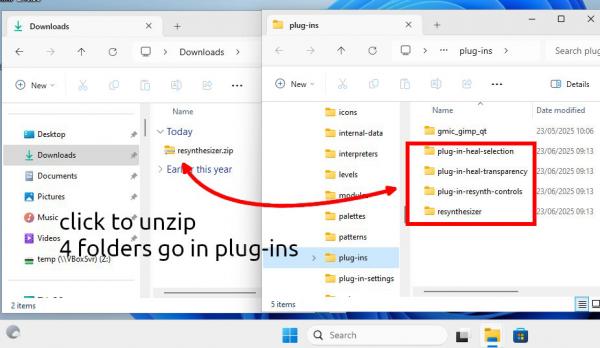
Attached two zips resynthesizer containing the most used files + extras.zip just in case you might need one.

For those new to plugins, this in Gimp 3.0


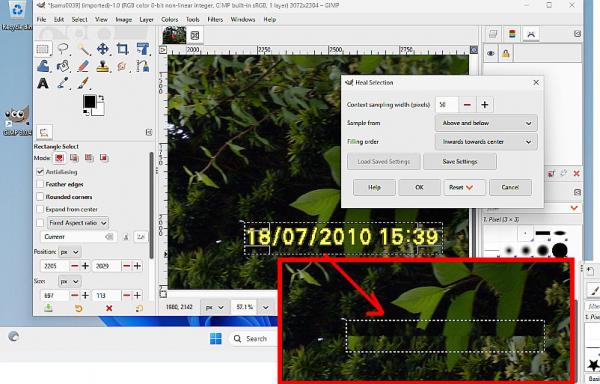
...and how does it work, most used these days is heal-selection in the Gimp Filters -> Enhance and an example. As with most graphic editing, it pays to practice.


Attached Files
.zip   resynthesizer.zip (Size: 130.45 KB / Downloads: 7,942)
.zip   extras.zip (Size: 22.59 KB / Downloads: 4,366)
Reply
#2
Hi Rich, I am trying your files. Thanks for making them. I put all of them, including the extras, in the plugins folder as per your screenshot. I am using Gimp 304 on Windows 11.
*The Map>Resynthesize works (well, at least the way it did before),
*Enhance>Heal selection works!
*Enhance>Heal transparency works too.
*Enlarge and Sharpen didn't fail immediately, because it enlarged the image, but then it seemed to freeze with the resynthesizing bar showing at the bottom. It may be taking longer than five minutes, though it was not a large image. i canceled...
*At the bottom of the filters menu, Resynthesizer(scm) >Sharpen by synthesis(scm) showed up, selecting brought up the dialog, but 'OK' led to
'Execution error for 'Sharpen by synthesis(scm)...​':
Error: eval: unbound variable: nil'
I couldn't find any of the other scripts in the menu.
Do you have any suggestions?
Reply
#3
They do not work, do not use them.

see: https://github.com/bootchk/resynthesizer...r3-Plugins which says

These plugins from Resynthesizer 2 are obsolete in Resynthesizer 3:

Filters>Enhance>Sharpen by Synthesis...
Filters>Enhance>Enlarge and Sharpen by Synthesis...


There are better ways to sharpen using Gimp, the gimp_gmic_qt plugin, has several sharpen filters.
Reply
#4
Just a note:
I don’t know if this is a regression or not.
But gimp 3.0.6 has a script folder in the same directory as the plugin folder 
And it will only look for scripts ( whether scm or not ) there .
The .exe still belongs in the plugin folder, 
It’s only the scripts that have changed.
Reply
#5
(12-08-2025, 11:41 AM)Sammeydw Wrote: Just a note:
I don’t know if this is a regression or not.
But gimp 3.0.6 has a script folder in the same directory as the plugin folder 
And it will only look for scripts ( whether scm or not ) there .
The .exe still belongs in the plugin folder, 
It’s only the scripts that have changed.

Do not be confused:  Gimp 3 does have script-fu plugins.  These start with a "shebang" like this

#!/usr/bin/env gimp-script-fu-interpreter-3.0  

The same as other Gimp3 plugins (.exe .py..) these go in their own folder ( inside the over-all plug-ins folder ) and in linux are executable.

There are script-fu scripts which do go in the scripts folder, but not these.
Reply
#6
Resynthesizer 3.0.1 — Community Windows x64 Build for GIMP 3.2.4

Hi everyone,
I recently built Resynthesizer 3.0.1 from source on Windows and successfully tested it with GIMP 3.2.4.
Since building Resynthesizer from source requires MSYS2/UCRT64, I packaged my successful build so Windows users can try it without having to compile it themselves.

Build information
  • Resynthesizer: 3.0.1
  • GIMP: 3.2.4
  • Platform: Windows x64
  • Build environment: MSYS2 UCRT64
  • GCC: 16.2.0
  • Meson: 1.11.2
  • Ninja: 1.13.2
Included plugins
  • Heal Selection
  • Heal Transparency
  • Resynth Controls
  • Map Style
  • Render Texture
  • Uncrop
  • Resynth Fill Pattern
  • Resynthesizer engine
I personally tested the build with GIMP 3.2.4, including Heal Selection, and it worked successfully.

Installation
  1. Close GIMP.
  2. Extract the attached ZIP.
  3. Copy the folders inside the ZIP to:
%APPDATA%\GIMP\3.2\plug-ins

The final structure should look like:

plug-ins\
├── resynthesizer\
│   └── resynthesizer.exe
├── plug-in-heal-selection\
│   └── plug-in-heal-selection.scm
├── plug-in-heal-transparency\
│   └── plug-in-heal-transparency.scm
├── plug-in-resynth-controls\
│   └── plug-in-resynth-controls.scm
├── plug-in-map-style\
│   └── plug-in-map-style.scm
├── plug-in-render-texture\
│   └── plug-in-render-texture.scm
├── plug-in-uncrop\
│   └── plug-in-uncrop.scm
└── plug-in-resynth-fill-pattern\
    └── plug-in-resynth-fill-pattern.scm

Restart GIMP.
Heal Selection should then be available under:
Filters → Enhance → Heal Selection

Download

Attachment:
resynthesizer-3.0.1-gimp3-win64.zip

SHA-256
53807fa1e51c57c5867679acecab777a23f7de652d697df7755354c792381ca2

I have also attached SHA256SUMS.txt for verification.

Important
This is a community build, not an official Windows binary/release from the Resynthesizer project.

Source:
https://github.com/bootchk/resynthesizer

I'd appreciate feedback from anyone who can test this on GIMP 3.2.x on Windows, particularly on a machine that doesn't have MSYS2 installed.


Thanks!


Attached Files
.zip   resynthesizer-3.0.1-gimp3-win64.zip (Size: 368.53 KB / Downloads: 7)
.txt   SHA256SUMS.txt (Size: 101 bytes / Downloads: 2)
Reply
#7
Working here with a clean Windows 11 VM installation. Gimp 3.2.4
Checked the heal plugins, working ok.
and also resynthesizer itself for making seamless tiles, ok.

EDIT: A quick switch to another setup. Windows 10 VM Gimp 3.2.2 and all working there.
Reply


Forum Jump: