Thread Rating:
  • 0 Vote(s) - 0 Average
  • 1
  • 2
  • 3
  • 4
  • 5
back in time : C=64
#1
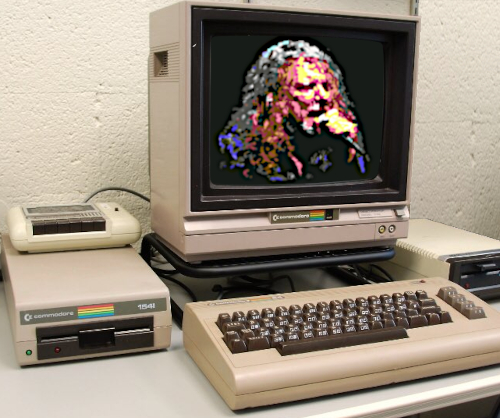
Some of us have good memories to the commodore 64 computer. It was in his time the most advanced home computer with 16 colors (later more in interlace), good sound (3 tone generators) and hires graphics. If one have a good photo that he want to send back to time of the C=64, then there is a program to convert it to the C=64 color resolution. Save it as prg file after conversion and you can load it in a C=64 emulator or in a real C=64 (if you own one yet). Save it as bmp file for use in gimp.     

https://commodore.software/downloads/dow...2mc-v2-12e

   
   
Reply
#2
You can do pretty much the same thing directly in Gimp with Filters>Blur>Pixellize and Image>Mode>Indexed and providing the appropriate palette.
Reply
#3
The C-64 in multiColor mode generates a screen with resolution 160*200 pixels/16 colors. One pixel represents an area 2*1 pixels big. The screen is divided into 40*25 attribute cells and each attribute cell is 4*8 pixel big. In this mode you can use maximum 4 colors in the attribute cell. Each pixel defined by 2 bites can have one of 4 different colors. One of colors is the background color. That's why you need specific software to generate a image like it was on a C-64 computer.
   
Reply
#4
For the true diehard Commodore 64 enthusiasts. Create/convert a photo/drawing and enlarge the drawing using sprites in the border of the C64 screen.

https://www.albertpixels.com

ALBERT is a multi-platform cross-development pixel art editor, brought to you by Luigi Di Fraia (aka TCE – code and ideas) and Joachim Ljunggren (aka The Sarge – UI/UX, ideas, and testing). ALBERT allows its users to create Commodore 64 images that extend into the left and right borders of the visible screen, with sprites to display the extra pixels, using an uncomplicated drawing workflow, without requiring the assistance of a coder


conversion

   
Reply


Forum Jump: