



4 hours ago
I have a problem with the fill bucket tool.
I scanned in a pencil drawing, removed the white background with color to alpha, and now I'm coloring it in.
The first bucket fill works like a charm, see screenshot.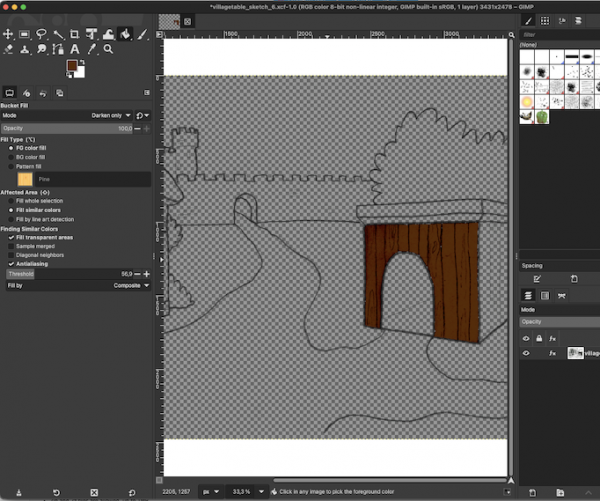
However WHATEVER I do next, (could be creating a new layer, or using another tool, or select something....anything.) the image gets distorted afterwards. The distortions also stay when saving/restarting gimp. (see screenshot 2)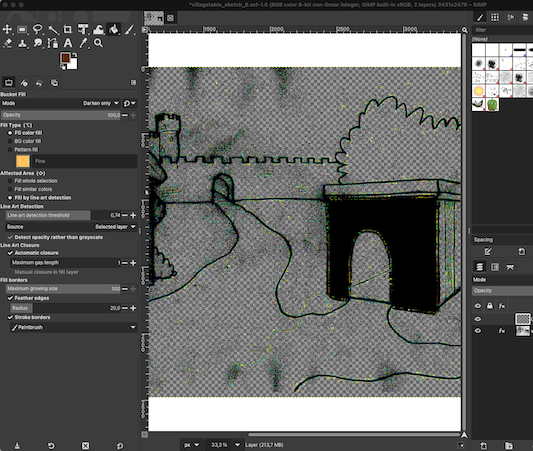
What am I missing here... or is this a bug?
I scanned in a pencil drawing, removed the white background with color to alpha, and now I'm coloring it in.
The first bucket fill works like a charm, see screenshot.
However WHATEVER I do next, (could be creating a new layer, or using another tool, or select something....anything.) the image gets distorted afterwards. The distortions also stay when saving/restarting gimp. (see screenshot 2)
What am I missing here... or is this a bug?
