




Some smartphone cameras allow you to capture a full panorama of a scene. However, the start and end points of the panorama rarely align seamlessly. To achieve a reasonably seamless result, you can try the following:
- split the panorama at a point where the image is not complex
- swap the positions of the two sections (2 layers)
- shift the 2 layers and use the 'Handle Transform Tool' to optimize the join
Ensure that the two ends of the panorama where it was split are not distorted.
Next, use the crop tool to cut away the unimportant part of the canvas, but be careful not to cut off any parts of the left or right side.
Use the FSPViewer to look at such a panorama.
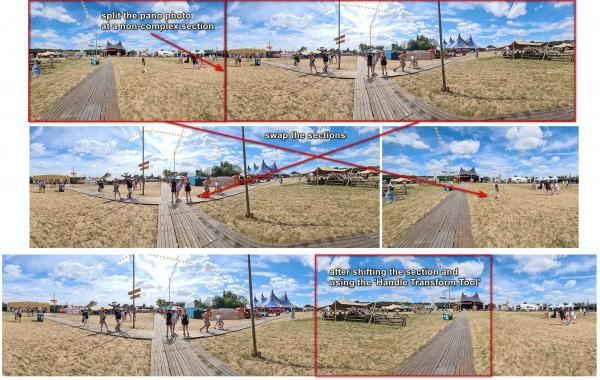
- split the panorama at a point where the image is not complex
- swap the positions of the two sections (2 layers)
- shift the 2 layers and use the 'Handle Transform Tool' to optimize the join
Ensure that the two ends of the panorama where it was split are not distorted.
Next, use the crop tool to cut away the unimportant part of the canvas, but be careful not to cut off any parts of the left or right side.
Use the FSPViewer to look at such a panorama.