| Welcome, Guest |
You have to register before you can post on our site.
|
| Latest Threads |
DOSBox release 4 December...
Forum: Other graphics software
Last Post: denzjos
Today, 07:48 AM
» Replies: 4
» Views: 4,523
|
Wacom tablet with GIMP 3....
Forum: General questions
Last Post: Grimpo
Today, 12:34 AM
» Replies: 9
» Views: 698
|
Separation-Luminosity-Cou...
Forum: Extending the GIMP
Last Post: denzjos
Yesterday, 04:32 PM
» Replies: 0
» Views: 84
|
Gimp 3.0 to 3.2 AppImage ...
Forum: Linux and other Unixen
Last Post: CmykStudent_
08-31-2026, 11:37 AM
» Replies: 2
» Views: 138
|
bunnywaffle plugins
Forum: Extending the GIMP
Last Post: denzjos
08-30-2026, 09:20 AM
» Replies: 4
» Views: 355
|
adding color after using ...
Forum: General questions
Last Post: CmykStudent_
08-29-2026, 06:14 PM
» Replies: 16
» Views: 982
|
Should I reinstall
Forum: General questions
Last Post: Grimpo
08-29-2026, 10:26 AM
» Replies: 6
» Views: 390
|
Rotate tool in 2.10 blurr...
Forum: Gimp 2.10
Last Post: CmykStudent_
08-27-2026, 05:28 PM
» Replies: 12
» Views: 29,591
|
to give the dots some var...
Forum: General questions
Last Post: sallyanne
08-27-2026, 02:33 AM
» Replies: 1
» Views: 259
|
Custom Theme Not Showing ...
Forum: General questions
Last Post: Buerre
08-25-2026, 02:03 PM
» Replies: 2
» Views: 325
|
|
|
| Export ALL opened images in GIMP at once with your settings |
|
Posted by: PixLab - 12-15-2023, 08:07 AM - Forum: Extending the GIMP
- No Replies
|
 |
Finally... GIMP's users can have their own settings for each type of image,
and once it's set, every opened images will be exported automatically with these setting.
This script (.scm) is a complete re-start - reconstruction, also it's recommended to remove the older script, it is not mandatory as this script has different declaration, and can coexist with my previous version in GIMP without any problem.
I did found a way for the users to input their settings when they batch export their opened images in GIMP, it's not beautiful as the code is extra long, but it works like a charm, it is very simple and I like simple. 
Purpose?
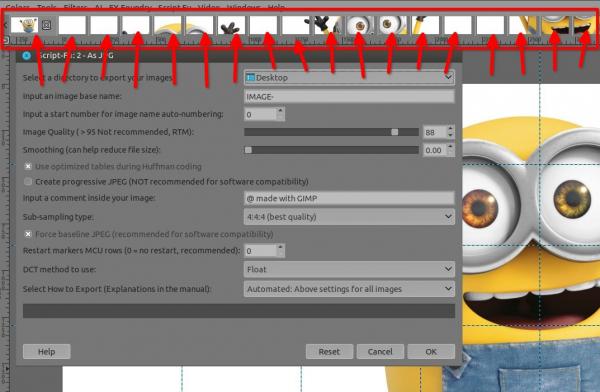
Batch export all opened images in GIMP with your settings
Example of opened images to batch export all at once with the same JPG settings
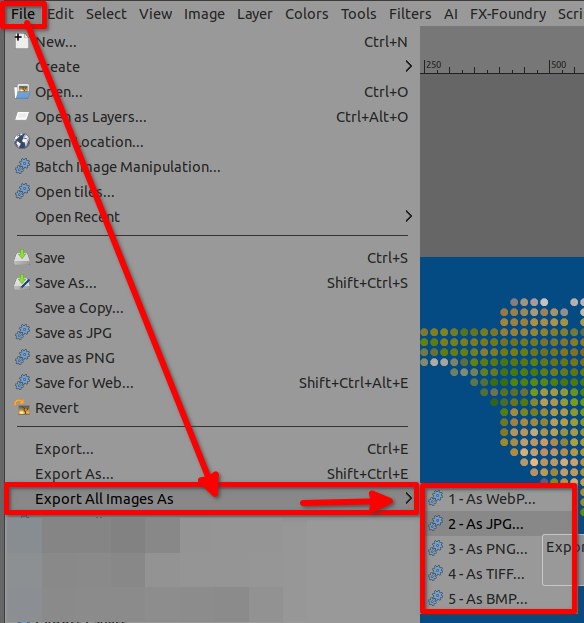
Where to find it in the GIMP's top menu?
There.
Where to Download this gorgeous script, that auto-export all at once?
Here:
 pxl-export-all-images-as-v3.7z (Size: 380.22 KB / Downloads: 2208)
How to install it in GIMP?
A manual-guide is included as PDF when you download the script/plugin, thus RTM
|

|
|
| Extracting Identical Pixels Between Two Layers |
|
Posted by: saltasaurus - 12-15-2023, 05:39 AM - Forum: General questions
- Replies (2)
|
 |
Hello, I am trying to cut out or isolate in some fashion all of the pixels that are identical between two images. These two images are different coloured variants of each other, and certain pixels are identical.
I was thinking of putting them into two layers and... I don't know lol. Just wondering if there is an easy way to go about this.
Note that I am NOT trying to delete these pixels. In the end, I would like to put them onto a layer on their own.
|
|
|
|
| Dateien aus OneDrive |
|
Posted by: r.jahn@drei.at - 12-14-2023, 04:33 PM - Forum: General questions
- Replies (1)
|
|
Ich habe Gimp 2.10.36 soeben installiert. Meine Dateien befinden sich alle auf OneDrive.
Wenn ich jetzt eine Datei in Gimp laden möchte, dauert das Ewig
In anderen Anwendungen ist das kein Problem.
Woran kann das liegen?
|
|
|
|
| Selction bounding box & shrink radius |
|
Posted by: david - 12-14-2023, 02:25 PM - Forum: Scripting questions
- Replies (3)
|
|
I have been trying for a couple of days to find the relationship between a selection bounding box and the radius which is used for shrink or grow selection.
My first thoughts were that the radius would be half the diagonal of the bounding box, but this appears not to be true.
In the Shrink/Grow/Feather LIVE PREVIEW GIMP by TinT he has used a binary search routine to find the shrink radius which reduces the selection size to zero in order to set the minimum value for the adjustment slider. However, this is very slow for large images.
I thought that there must be a mathematical formula for the shrink radius that would reduce the size of the smallest bounding box side to half of it's original value.
Help from our resident geniuses greatly appreciated!
david.
|
|
|
|
| Objects not in the layer panel. |
|
Posted by: Whywhywhy - 12-13-2023, 01:49 PM - Forum: General questions
- Replies (3)
|
|
Hello, I've never had this problem. When I create a new rectangle, it does not generate a layer in the layer panel. I can't select the new object or do anything with it. Does anyone know why? I'd like to attach a screen shot, but the clipboard viewer drives me insane. Any better options there also? Thanks in Advance. J.
|
|
|
|
|