| Welcome, Guest |
You have to register before you can post on our site.
|
| Forum Statistics |
» Members: 4,895
» Latest member: nekcab
» Forum threads: 7,955
» Forum posts: 43,279
Full Statistics
|
| Latest Threads |
panorama correction
Forum: Tutorials and tips
Last Post: denzjos
7 hours ago
» Replies: 0
» Views: 35
|
GIMP for win xp 32 bit pr...
Forum: Older Gimp versions (2.8, 2.6....)
Last Post: rich2005
8 hours ago
» Replies: 11
» Views: 627
|
resynthesizer 1.0
Forum: Extending the GIMP
Last Post: rich2005
8 hours ago
» Replies: 4
» Views: 133
|
Picture Frame Glass Effec...
Forum: General questions
Last Post: sallyanne
Yesterday, 01:32 PM
» Replies: 6
» Views: 452
|
Resynthesizer for Windows...
Forum: Extending the GIMP
Last Post: rich2005
08-11-2026, 05:19 PM
» Replies: 6
» Views: 34,356
|
Is there a gimp plugin th...
Forum: Extending the GIMP
Last Post: rich2005
08-11-2026, 10:43 AM
» Replies: 10
» Views: 20,509
|
Excellent Tutoriols for b...
Forum: Tutorials and tips
Last Post: rich2005
08-10-2026, 08:30 AM
» Replies: 3
» Views: 373
|
add links for one dot to ...
Forum: General questions
Last Post: saint_m
08-10-2026, 07:44 AM
» Replies: 4
» Views: 377
|
imgur blocked
Forum: Watercooler
Last Post: R Soul
08-09-2026, 12:51 AM
» Replies: 5
» Views: 2,746
|
Layers
Forum: General questions
Last Post: TeckyWalla
08-08-2026, 09:07 PM
» Replies: 2
» Views: 309
|
|
|
| Splitting Up The Details/Colors Of A Texture And Moving Them Into Layers |
|
Posted by: OpenString - 09-06-2019, 11:47 AM - Forum: General questions
- No Replies
|
 |
Hello,
I've started creating a new Website but my main feature has some problems.
When loading in 3D models into my web page, the complexity of the model is not really a problem, not after compression.
The real problem I have is with the texture size. For realistic PBR Assets it is required to go at least 4k. For some
reason this takes a really long time. As opposed to for example sketchfab.com, the models there seem to load pretty fast.
I've already come up with a solution, which would be to progressively load in low- and high resolution textures at the same
time so that the user doesn't need to stare at nothing while he waits for the model to load.
(just a side note, I'm not using any database at the moment. I could use MySql, however I don't know if that's going to
speed up the image readiness or not - if someone here knows an answer to this please let me know.)
What I want to do instead:
Loading in multiple textures in different resolutions seems a little wrong. So I've come up with a different idea which would
involve some image manipulation but I have no idea where to start.
What I want to do is separate one texture into multiple layers (so the resolution stays the same). Each layer should have only a
part of the image on it - let's say for example only a set of specific colors (the detail so to speak). Most importantly is that these
layers must not rely on an alpha channel. When we overlay these maps we should be able to increase the detail level gradually.
The idea basically is to take the model and first put a 4k map on it. This first map has has only very basic data, like the
color and the shape. Like that the file size should be significantly reduced and the texture is loaded faster. In theory we can
then just continue to overlay all the remaining maps as the become ready until the model is fully loaded.
I think like this the result might look a little better because instead of looking at a blurry mess while the user is waiting
he can actually see how the detail is progressively added to the mesh.
Hope this explanation helps for more details you can checkout the website and the dev space:
www.opensting-studios.com <-- all 4k maps applied, very long loading
www.dev.opensting-studios.com <-- no map, high poly model still loads fast
remember again: I'm not using any database! Tell me if I should use one, if that means it will increase the performance..
If anyone can help me out how to achieve this effect in gimp, or maybe there's even a small program out there that does exactly what
I need. The only thing I could find was a website which splits the image into multiple sections, which is not what I need.
Thanks a lot!
|

|
|
| Nothing is happening |
|
Posted by: Bonjameen - 09-04-2019, 09:31 PM - Forum: General questions
- Replies (5)
|
|
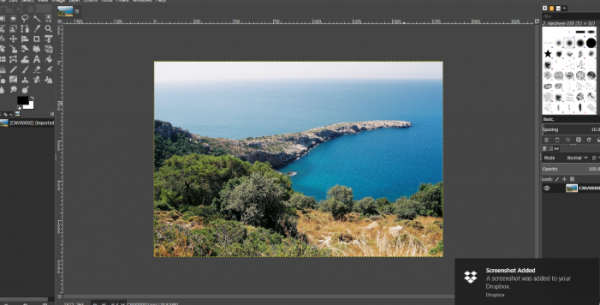
Hi guys, sorry if my question is answered somewhere but I can't find the solution and I've encountered this problem twice on two separate machines. Re-booting and re-installing does nothing, it's as if once I encounter this problem, my computer refuses to work with GIMP anymore.
Anyway, to the problem. I use GIMP for Photo Editing, I just got GIMP installed on my newly delivered Windows 10 laptop. After a few hours, none of the tools in the color drop down will do anything. I encountered a similar problem about a year ago on a completely different machine, where nothing will seem to work. I can draw, it seems I can use the main tools on the left, but none of the tools I require work. I'm so fed up and tired of encountering this problem, a problem that literally nobody else on the internet seems to have encountered. So can someone please explain what is happening, because the last time this happened I gave up and didnt use GIMP on that machine again, I dont want to have to pay Adobe. The screenshot of what it looks like is attached, have a look at what's wrong.
|
|
|
|
| Recreating an image |
|
Posted by: Viceroy07 - 09-04-2019, 12:20 PM - Forum: General questions
- Replies (6)
|
|
Hello everyone,
I have been trying to imitate this image. So far I have created this but I am still not satisfied with the results. I have cloud brushes installed but I feel like this requires more tools to be used. I do not know what other tools or in what order to use them. So far I have been using brush and smudge and adjusting opacity, hardness, size and toughness. I also want to have this ''misty/foggy'' background behind clouds.
How can I achieve best results like in the first image? What steps do I need to follow?
|
|
|
|
|




![[Image: 3fb5f55bab2941a5e7eb2bc18f537d28-full.png]](https://cdn1.imggmi.com/uploads/2019/9/4/3fb5f55bab2941a5e7eb2bc18f537d28-full.png)


